Publishing
Version your package, let Credible prepare it for serving, and serve it to every consumer
Publishing turns your model — with its discovery, access, and performance annotations — into a versioned package that Credible serves to every consumer: workspace chat, data apps, MCP agents, and the REST APIs.
Packages: The Unit of Publishing
A package is a folder containing your model and everything that ships with it:
.malloyfiles — data model definitions- Data apps — dashboards and applications built on the model, shipped as a
public/directory of plain web files. A data app queries the package's own models — with all access rules applied — and automatically appears in every workspace the package is added to - Data files (CSV or Parquet) — embedded data published with the package (see Embedded Data)
publisher.json— the package manifest
Packages can also include .malloynb notebooks, which render as reports in workspaces — but for new dashboards and curated views, build a data app.
A package is published and versioned as a single unit: model, metadata, access rules, apps, and manifest move together, so every version is complete and reproducible, and rolls back as a whole.
The Package Manifest
publisher.json identifies the package — name, version, and description — and optionally sets serving policy:
{
    "name": "ecommerce",
    "version": "0.0.1",
    "description": "ecommerce demo data",
    "scope": "package",
    "materialization": { "freshness": { "window": "24h", "fallback": "live" } }
}
scope and materialization.freshness control how derived copies are reused across versions and kept fresh; see Performance & Cost. Which sources callers can query is set in the model's index.malloy, not the manifest; see Curating Discovery.
How to Publish
Wherever you build, one step takes a draft to a published version:
-
In the Credible App — ask the agent to publish your draft. It packages the draft, deploys it to your environment, and confirms the published version. See Build & Publish.
-
In your IDE — type
/credible-publishin your agent's chat. The agent creates apublisher.jsonif needed, bumps the version on a republish (versions are immutable), and runs the publish for you. -
With the CLI directly:
npm i -g @credibledata/cred-cli   # install (once)
cred login <organizationName>     # authenticate (once)
cred set environment <environmentName>
cd /path/to/your/package
cred publish --set-latest
The
--set-latestflag promotes the version to the package's "latest" immediately, before its indexes and materialized tables are built. You can usually omit it: with auto-promote (on by default), the new version is promoted automatically once it's fully built and ready to serve. See the CLI page for all commands. -
From CI/CD — automate publishing when changes merge to Git. A GitHub Actions workflow versions and publishes the package on every merge, so your main branch is always what's served. See CI/CD Setup.
What Happens When You Publish
Credible prepares the new version for serving in four steps:
-
Validate and version. The service compiles the model and creates a new immutable version of the package. Model errors and publish-time guardrails (like the indexed-dimension rules) surface here — as publish errors, not silent wrong answers downstream.
-
Build derived copies. Every
#@ persistsource is materialized and every#(index)dimension gets its search index built, sequenced so an index derives from the materialized table it depends on. From then on, the engine keeps these copies fresh on your declared objectives. See Performance & Cost. -
Build the concept index. The engine compresses the exported sources, their fields,
#(doc)descriptions, and#(index)values into the concept index, which agents search by meaning. This usually takes a minute or two; a model spanning hundreds of tables can take 10 minutes or more. -
Enforce access rules.
#(authorize),#(access_filter), and secure givens apply to every query against the served version, on every surface.
The package page rolls all of this up into a single build status per version — Building while indexing and materialization are in flight, then Ready once the version has settled into a servable state (or Failed if either side failed).
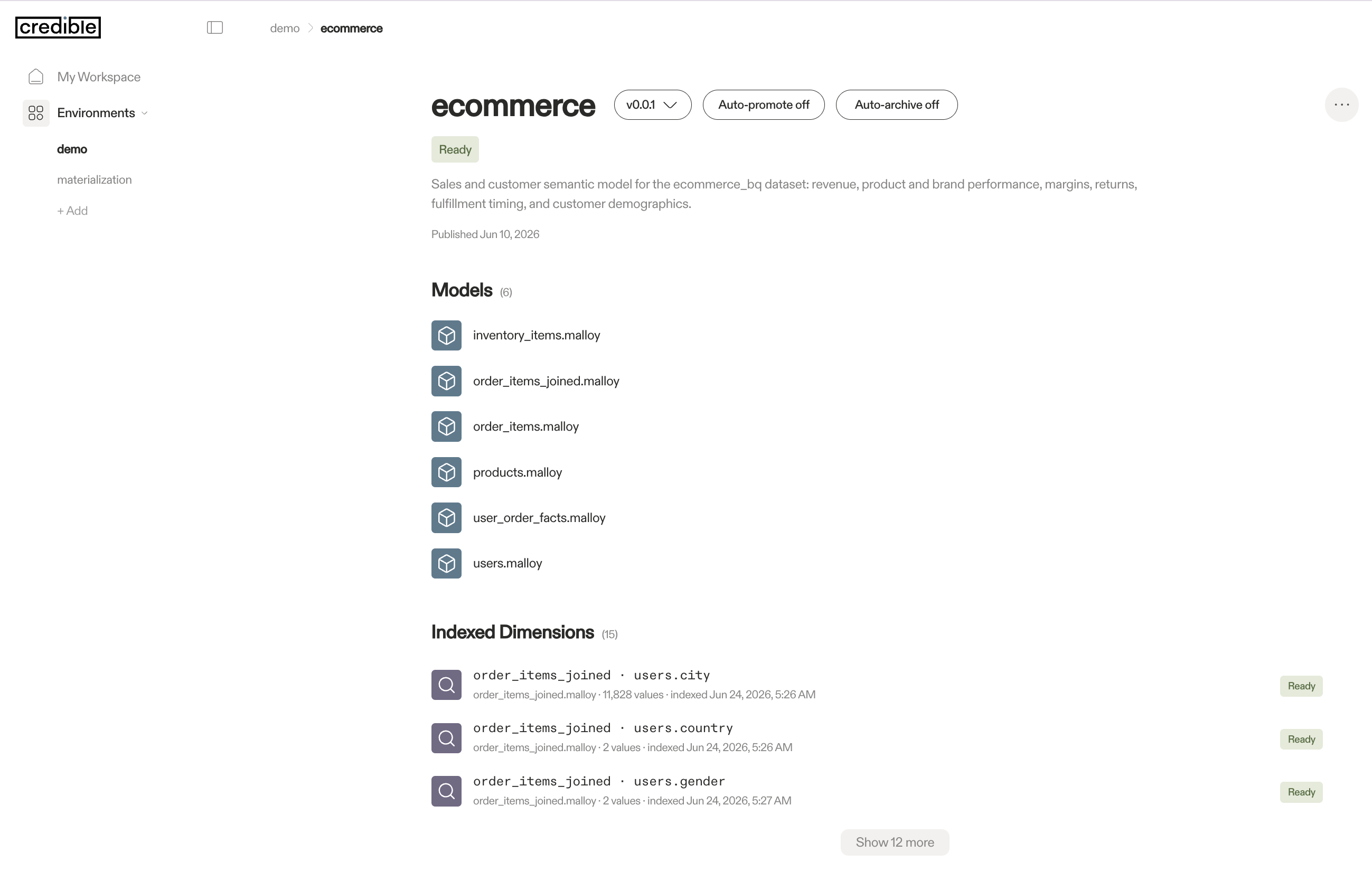
Until indexing completes, the get_context MCP tool will not return results for the new version. The execute_query tool and Data API are available immediately after publishing.
Serving and Version Management
Versions work like software releases:
- One pinned "latest". One version is designated as latest — the default served to consumers who don't specify a version. Consumers on "latest" automatically pick up updates when the pin moves; consumers that need stability (like a production dashboard) can pin to a specific version.
- Versions remain available. Published versions are preserved, enabling rollbacks, pinned production deployments, gradual adoption across teams, and historical audits.
Two package-level policies automate the routine parts, so most packages never need manual version management:
Auto-Promote
With auto-promote (on by default), publishing arms the new version, and Credible promotes it to the package's latest once it is ready — fully indexed, with its materialized tables built. You publish; Credible waits for the version to be servable and then moves the pin.
This is safer than promoting at publish time: consumers never get switched to a version whose indexes and tables are still building, and a version whose build fails is never promoted. Two guardrails keep it predictable:
- Rollbacks stick. Auto-promote only promotes a version that has never been latest. If you roll back by re-pinning an older version, Credible won't fight you and re-pin the newer one.
- No going backward. A version that's ready but older than the current latest isn't promoted.
Turn auto-promote off if you want to control promotion yourself — for example, to validate a version by querying it directly before manually pinning it as latest.
Auto-Archive
With auto-archive (on by default, with a 30-day retention), Credible reclaims old versions automatically: once a version stops being latest, it's retained for the package's retention window and then archived — removed from service. The current latest is never archived, and the window gives you a cheap rollback target for as long as it lasts.
Archiving also reclaims storage for derived copies no other version uses; see Storage Reclamation.
Tune the retention to your rollback needs: units are seconds to weeks (24h, 30d, 2w), and 0 archives a version as soon as it's demoted — a keep-only-latest mode that minimizes storage cost but gives up the instant-rollback window. Turn auto-archive off to retain every version indefinitely.
Both policies are configured per package — on the package page in the Credible App or via the Admin API — and they're independent: use either without the other.
Viewing Published Versions
-
Credible App at
https://your-org.app.credibledata.com— navigate to your environment and click a package to see complete version history, pin or unpin versions, check build and indexing status, and view package metadata -
Credible CLI — list a package's versions from the command line:
cred ls versions <packageName>
Next Steps
Your model is served. Now put it to work: